
Set real dimensions
Work with finished width, height, depth, and units instead of being locked to one static mockup.
3D Box Studio is a free online 3D box maker and simulator. Choose a box style, enter exact dimensions, design on the dieline, fold it in 3D, and export a PNG mockup or a print-ready PDF dieline. All you need is a free account—no software to install.
What you can do
Work with finished width, height, depth, and units instead of being locked to one static mockup.
Edit artwork on the flat packaging layout, then see the same design update in 3D.
Upload, drag, crop, resize, rotate, and organize artwork in layers.
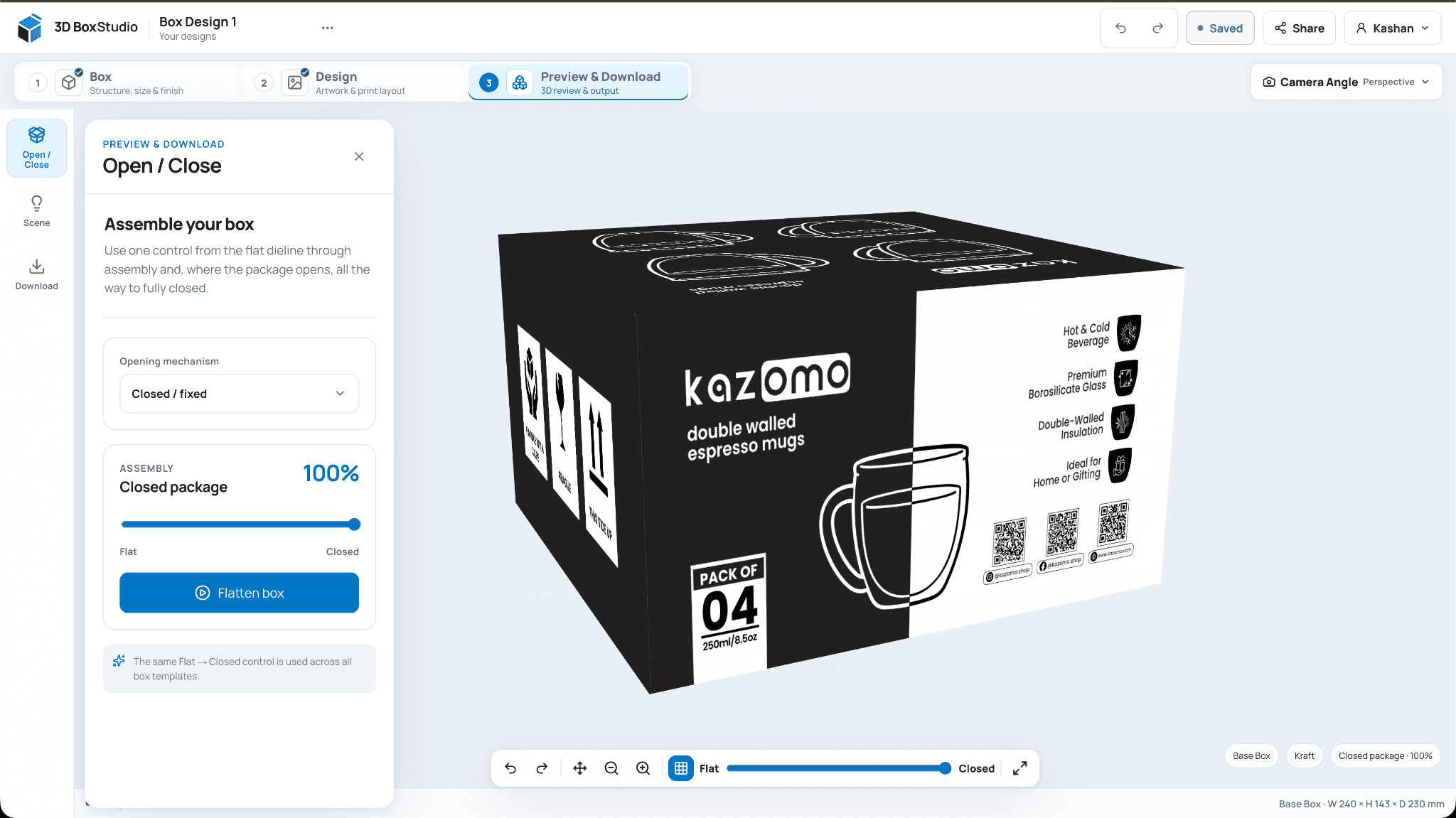
Orbit, zoom, switch camera views, and review how graphics wrap around the finished package.
Preview folding and opening behavior so the structure is easier to understand before a sample exists.
Create clean PNG previews for decks, approvals, product planning, and client review.
The core workflow
Start with the box, design on its 2D flat layout, then use the same project to inspect the assembled result in 3D.
Pick a packaging structure, set finished dimensions and units, and adjust the material or finish.
Work on the dieline with uploads, layers, drag-and-drop placement, crop, resize, rotation, and exact transforms.
Rotate the package, change camera views, open or close the structure, then export a PNG or share a preview.
Actual product, not a static mockup
The Design workspace gives you a flat packaging canvas for artwork and layers. The Preview workspace uses that same design state, so a change on the dieline can be checked immediately on the assembled package.
Current V2 Studio footage showing the same package moving between flat and assembled views.
Dimensions + structure
Change finished dimensions directly in the Studio, switch units, and work with packaging structures instead of stretching a flat image template. Opening and folding controls help you understand how the package behaves as well as how it looks.
Artwork without mockup gymnastics
Place artwork on the flat package, use normal visual editing controls, and let the 3D view do the perspective work. That makes iteration much faster when a logo, panel graphic, or crop needs to change.
Review from every angle
Rotate and zoom the package, jump between camera angles, review materials and finishes, and scrub through opening or closing behavior. When the proof is ready, download a clean PNG for the next conversation.
 Structure, artwork, material, and presentation in one visual workflow.
Templates, not one-size-fits-all mockups
3D Box Studio is being built around reusable structure templates such as folding cartons, tuck-style boxes, lids, and mailer-style packaging. Each template owns its geometry, dieline behavior, and opening logic so new structures can be added without hard-coding the whole Studio around one box.
Dieline generation
For supported structures, 3D Box Studio can use box dimensions and template geometry to create the flat layout you design on. That is useful for artwork planning, panel placement, and structure visualization.
Built for real packaging conversations
Move between dieline artwork and 3D without rebuilding a Photoshop mockup after every change.
Give customers a clearer visual approval layer before the production file reaches press.
Share a browser preview instead of sending another round of flat screenshots.
Test proportions, branding, and presentation angles before photography or manufacturing.
Create a believable package preview without learning heavyweight structural CAD.
Save, reopen, and share the same design so feedback stays attached to one visual source.
Frequently asked questions
3D Box Studio is a free online 3D box designer and packaging mockup generator. It combines supported box structures, dimensions, a 2D flat-layout artwork workspace, and interactive 3D review in the browser. Using the Studio requires a free account.
3D Box Studio is a free browser-based packaging design and visualization workspace. You choose a supported box structure, set finished dimensions, place artwork on the flat layout, inspect the same design in 3D, and export or share the result.
Yes. Supported structures can be resized using finished width, height, depth, and selectable units so the preview reflects the proportions you are actually designing for.
For supported structures, the Studio can generate the flat layout used for artwork placement and visualization from the template and finished dimensions. Final production geometry should still be validated before manufacturing.
Not universally. Use it for design, panel planning, and visualization, then validate bleed, board thickness, fold and cut tolerances, glue areas, tooling, and printer-specific requirements before manufacturing.
Yes. Upload or drag artwork into the Design workspace, then crop, resize, rotate, position, replace, and organize it in layers.
Yes. The 2D flat-layout workspace and the 3D preview use the same project state, so artwork changes can be reviewed on the assembled package without rebuilding a separate mockup.
Supported structures include opening and folding behavior that can be reviewed in the 3D workspace. The exact motion depends on the selected box structure.
Yes. Account-based projects can be saved and reopened later so you can continue iterating instead of rebuilding the mockup from scratch.
Yes. Saved projects can create shareable preview links so clients or teammates can inspect the package without receiving the editable working file.
PNG images of the 3D box for listings and presentations, a short MP4 of the box folding closed and turning, a 1:1 PDF of the dieline with your artwork and bleed for the printer, and the cutting template on its own as SVG or DXF for die makers and cutting machines.
No additional software is required to use the Studio's packaging artwork and 3D preview workflow. You may still use specialist design or structural CAD tools when your production process requires them.
No. It is designed for packaging design, visualization, and review. Final manufacturing files, structural tolerances, material behavior, and press requirements should still be validated in the appropriate production workflow.
No. 3D Box Studio runs in a modern browser. A current desktop browser with hardware-accelerated WebGL gives the best editing and 3D experience.
The current Studio includes visual presets such as white board, kraft, soft touch, matte coated, gloss coated, and foil, plus outside and inside color controls.
Yes. You can use exports from your own designs in client work, presentations, marketing, and e-commerce planning as long as you have the rights to the artwork and other assets you upload.
PNG previews can help with concept work, internal approvals, and listing planning. Before publishing, verify that the final image meets the current requirements of the marketplace you are using.
Your next package starts here
Create a free account, choose a box, set the size, place the artwork, and inspect it in 3D.
Open 3D Box Studio